Assessment
Find information and resources about submitting assignments, requesting extensions and exam viewing appointments
Assignment Submission
The majority of assignments for subjects offered by the Faculty of Business and Economics will be submitted online through the Assignment Submission Tool. The Assignment Tool can be accessed by logging into the Learning Management System (LMS) and accessing the relevant subject page. You should consult your tutor or subject coordinator to ascertain the submission method of your assignments.
You can find further information regarding assignment submission at ask.unimelb.
Assessment Adjustments – Extensions and Special Considerations
Unexpected circumstances can sometimes affect your ability to complete assessments on time. If this happens, there are short-term assessment adjustments available depending on your situation and assessment type.
The short-term adjustments this University provides are:
- Short extensions: a one-off extended period of 3 days to submit an assignment
- Extensions: a longer period of time to submit an assignment
- Special consideration: an adjustment for any assessment item, including exams, oral presentations and attendance hurdles
All requests for these short-term adjustments are created, tracked and managed in the Extensions and Special Consideration application form. See the Assessment Adjustments page for information on what adjustments are right for your circumstances and how to apply.
If you are experiencing long term impacts due to a disability, ongoing health conditions, or eligible commitments, you may be eligible for ongoing support with an Academic Adjustment Plan (AAP). Students with a verified AAP can find out how to activate their supports (including extensions) on the Action your Plan page.
Exam Viewing Appointments
Appointments will take place after the official results release date. Subject Coordinators will upload available appointment times on LMS/Canvas. For any enquiries regarding exam viewing appointments, please contact your Subject Coordinators directly.
Exam viewing appointments are opportunities for you to view your exam paper and the marks you have received for each question. You cannot request a remarking of your paper or negotiate for additional marks. It is an opportunity for feedback only. Please keep in mind the following:
- Please do not book more than one appointment per subject.
- Students who are sitting a supplementary or special exam are not permitted to view their original exam paper.
- You must present your Student ID card at your appointment.
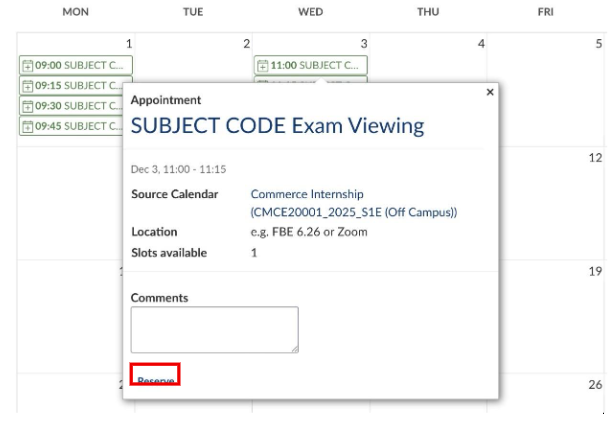
- For Zoom appointments, you will find the Zoom link in the appointment details in your LMS calendar. When you enter the Zoom appointment, you will be in a waiting room. You need to wait until the academic grants you access to the meeting.
- Appointment times are in Australian Eastern Standard Time (AEST). Please allow for time zone differences if you are overseas.
How to reserve an exam viewing appointments
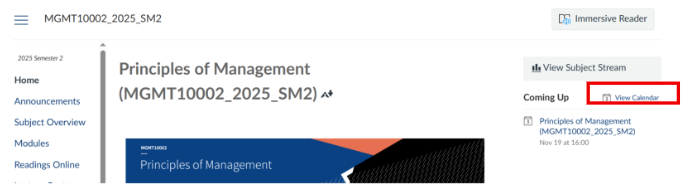
1. Log in to your subject's LMS page, and select View Calendar on the right-hand side.
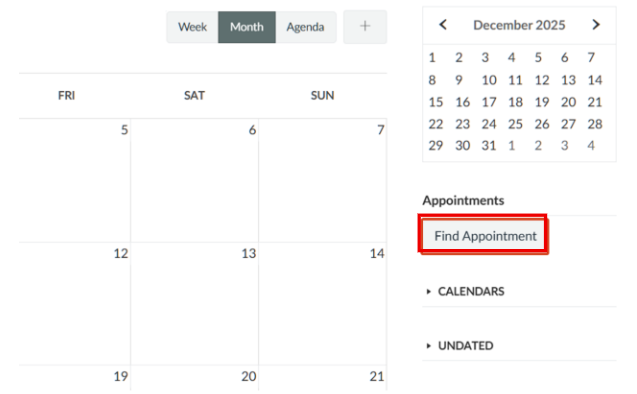
2. Select Find Appointment to view and reserve available slots.
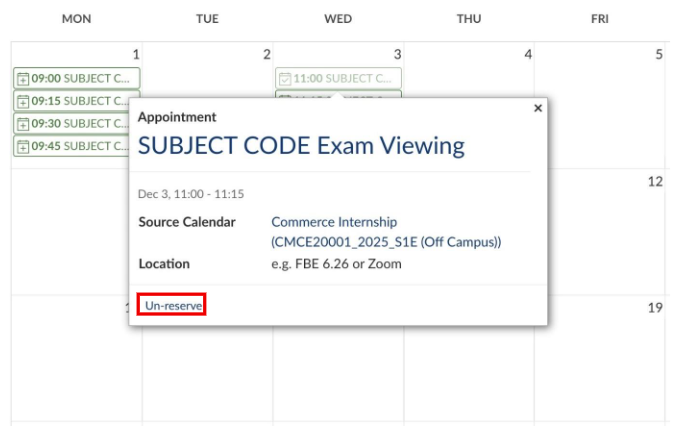
To cancel an appointment, simply click on the appointment time and select Un-Reserve.
If you have any queries regarding Exam Viewing, please check our FAQ page.
Resources
Special Consideration
Special consideration is available where a student may experience unexpected circumstances such as a sudden illness or bereavement or require long-term, ongoing support due to a disability or health condition.
More information on Special Consideration can be found on the Student Support page.
Alternative Exam Arrangement
An Alternative Exam Arrangement (AEA) is available to students who have been granted Special Consideration for ongoing support.
Find out more information on AEAs.
Academic Honesty and Plagiarism
The University of Melbourne believes that excellence in teaching and learning can be achieved in an intellectual environment where academic integrity is highly valued and carefully upheld.
Plagiarism occurs if you use information or someone else's ideas without acknowledgment, and is not necessarily the same as infringing copyright. For further information about how to avoid plagiarism and infringing copyright, please visit the academic integrity website.
Assessment and Results Policy (MPF1326)
Access the University of Melbourne Assessment and Results Policy.